

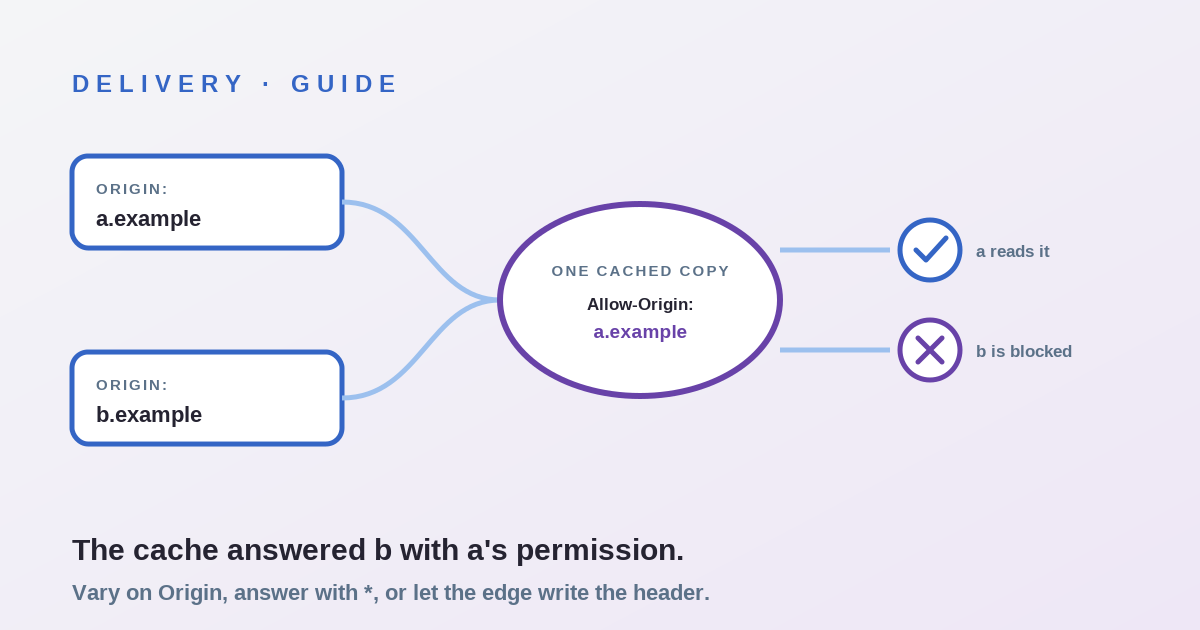
Most CORS errors behind a CDN have one cause: the origin reflects the requesting site in Access-Control-Allow-Origin, the CDN caches that answer, and the next site to ask gets a header naming someone else. The browser blocks the response, and the error looks random because it depends on who filled the cache first. The fix is to make the cache aware of the Origin header, or to stop the answer depending on it.
Step 1: prove it is the cache
Request the same URL twice through the CDN with different origins, for example curl -sI -H "Origin: https://a.example" https://cdn.example/font.woff2 and then Origin: https://b.example. If the second response still says a.example and carries an age or a cache hit, the CDN is serving a stored copy. If the header is missing altogether, check whether the object was cached before CORS was configured at the origin: those copies keep failing until they are purged. Fonts are the usual victim, as our guide to caching fonts and third-party assets explains, followed by API responses and video segments fetched by a player on another domain.
Step 2: choose one of three fixes
- Answer with a wildcard. If the resource is public and requests carry no cookies or credentials, send
Access-Control-Allow-Origin: *. One answer fits every site, so nothing needs to vary. Credentialed requests cannot use it. - Reflect and vary. If only listed sites may read the resource, the origin checks
Originagainst an allow-list, echoes it back, and addsVary: Origin. Add it to error responses on the same paths too, or a cached 403 leaks across sites. The cost is one cache entry per calling site, covered in our piece on Vary and cache keys. - Let the CDN add the headers. The edge reads
Originon each request and writes the CORS headers on the way out, so the cached object stays the same for everyone and no variation is stored.
Pick one layer to own CORS. When origin and edge both add the header, browsers receive two values and reject the response.
Step 3: set it up on your CDN
On CloudFront, a response headers policy sets CORS headers per viewer request, and AWS's launch post notes it allows several sites without adding Origin to the cache key. If the origin must decide instead, forward Origin and the two Access-Control-Request-* headers through an origin request policy, and add Origin to the cache policy only when the response really differs per site.
On Cloudflare, the origin's Vary header was long ignored for most content. Since mid-2026 Vary in Cache Rules works on every plan: the origin names the header and the rule decides whether to key on it, normalise it or bypass the cache. Without such a rule, add the headers at the edge with a response header rule or a Worker.
Elsewhere, check whether the platform honours Vary: Origin at all before relying on it; some keep only their default cache key.
Step 4: tame the preflight
Requests with custom headers or methods other than GET and POST trigger an OPTIONS preflight first. Return Access-Control-Max-Age so browsers reuse the answer: Chromium caps it at two hours and Firefox at 24 hours, and without it the default is five seconds. Answer preflights at the edge or let them through uncached, but never cache one preflight for every Origin. For APIs, our guide to putting an API behind a CDN covers the rest of the path.
Step 5: purge and verify
After the change, purge the affected paths, because copies stored with the wrong header stay wrong until they expire. Then repeat the two-origin test from Step 1, and add it to your monitoring so a later configuration change cannot quietly bring the failure back.
CORS failing only for some users or some regions? The assessment traces it through every cache on the path.